
Today’s blog was written by Nathanael Gay, Data Analysis and Visualization Librarian from Florida State University. He completed a capstone project with Tulane University, as part of the Data Services Continuing Professional Education (DSCPE) program, which involved creating guidance on the DMP Tool about his experience. We were able to chat with Nathanael about his experiences, both to discuss this blog post and to share feedback that would help in our rebuild development. First we’ll have Nathanael’s post, and then we’ll have some thoughts at the end from the DMP Tool side.
Nathanael’s Post
I am a novice in both data management and in the user/administrative sides of DMP Tool. This posting describes my experience in creating guidance in the DMP Tool administrative backend.
Key-takeaways
- Anyone new to DMP Tool should make a mock project to experiment with the tool
- Links to DMP Tool pages within the guidance will cause the guidance not to save
- If you are authoring guidance outside of DMP Tool with the plan to copying into DMP Tool later, do that with caution. Formatting (line-spacing, indentions) can become inconsistent, and any links you made will not copy over.
The Project
The Data Services Continuing Professional Education (DSCPE) is a way for early career librarians to gain valuable experience in learning about and implementing data services. It is a 12-week intensive program that combines readings, pre-recorded lessons, synchronous meetings, and a 50-hour capstone project. For my capstone project I was paired with Kay P Maye from Tulane University. I got to be a part of library meetings, see a data management presentation, and was assigned a task of creating guidance within DMP Tool.
On The Importance of Creating Mock Plans
Part of my learning about DMP Tool was making mock plans. Kay P encouraged me to make a lot of mock plans and that definitely helped orient me to DMP Tool. I created mock plans with different funding agencies to see what elements they asked for and what guidance they provided. I did the same for different institutions, accessing what other universities considered important for researchers to know.
Cautions About the Current Guidance Editor
When it came time to author guidance I made an ill-fated decision: I authored the guidance in Word first. Part of this choice was to make a shareable document for approval from my capstone mentor and the team at Tulane. The other part was to make the guidance editable on my part as I went over several revisions. Sensible reasons all, but anyone walking a similar path should go in open eyed as to the implicit choices that are being made. Here are three lessons I learned about authoring guidance in the current iteration of DMP Tool.
First, a minor problem, spacing does not transfer as you would hope. This was especially notable around bulleted lists. To make a bulleted list look its best within the guidance editor, I had to:
- delete spacing and bullets
- insert a hard return
- then add bullets back
Second, a problem with a much larger time commitment, links will not transfer. The guidance I authored relied heavily upon linking to other resources. Being new to the Data Management and Sharing Plan space, I barely knew it existed prior to the DSCPE, I did not want to author anything that claimed me as an authority and instead link to other resources that I found useful. Therefore, I linked to external resources with abandon, and every one of them was stripped to plain text when I copied it into DMP Tool. At first, I thought this was a mistake; I tried copying differently, I copied from Word to a barebones text editor, and then copied to DMP Tool. I tested some HTML to see if that would work. Nothing I tried worked, and once I made it to acceptance, I set about transferring the links manually. Fortunately, I had created an EXCEL file of all my links and where they appeared which made the process faster than it could have been.
Third, with my formatting fixed, my links relinked, I submitted the guidance and I was immediately faced with an access denied error. I thought that my session had expired. But it had not. So I did what I think anyone would do in my situation, and I submitted again. And of course, received the same error. At this point, I set the process aside and came back to it later. When I could face it again, I composed a silly sentence and submitted it with no problems. So DMP Tool was working, just not with my guidance. I did not know if it was something about what I had composed, was there a word limit, some disallowed formatting combination, my links. Through trial-and-error I determined that the error was caused by this link. A link I included at the bottom of all the guidance I authored. It seems that linking to a DMP Tool page from within guidance is not allowed.
Within the current DMP Tool guidance authoring tool, I can offer this advice, especially if you are composing guidance outside of DMP Tool:
- Do not be precious about your formatting, certainly not if you are creating lists. You will likely need to change it if you are fussy about its looks.
- Links you make outside of DMP Tool will not survive copying into the guidance editor. Plan accordingly.
- Do not link to a DMP Tool page within the guidance. It will cause an access error.
The Future
The future does not hold the annoyances that I experienced. When I presented my capstone and recounted these self-inflicted wounds, a DMP Tool board member, Megan O’Donnell, suggested that this could make an interesting blog post. Becky Grady gave Kay P and I a preview of what is planned in the updated DMP Tool interface. If you are familiar with authoring guidance in the current DMP Tool you will see an immediate difference as you are presented with all your guidance, by tag, in a continuous list. You will not have to wonder what you generated guidance and on; you will just see it all. And in a change that I find delightful, the developers transformed the source of my biggest tedium; the new guidance interface will preserve links when they are copied.
Those are just as few of the changes that await you when the new tool rolls out.
Comments from Becky Grady, product manager for the DMP Tool
We are so grateful for Nathanael sharing his experience on the DMP Tool, both so we can improve the tool and to help other admins starting out.
Organizational guidance is the heart of the DMP Tool, so it’s important for the experience to work well for admins. While it’s helpful to have all the funder templates and best practices in one place, what adds value to the process of writing a DMP is getting Guidance specific to one university available to researchers of that organization. There, they can see general best practices, funder requirements, and university-specific guidance and policies all in one place while they write their plan.
While much of the functionality of this will be the same in the rebuild, we’re planning to make some changes to make it easier for org admins to prepare and published Guidance related to specific topics. These were called “Themes” in the current tool, though we’re planning to rename these to “Tags” in the rebuild to better convey the functionality.
The changes that we’re exploring changing and reviewed with Nathanael (though we will continue to refine based on feedback and thus these might change):
- Removing some aspects of Guidance Text that weren’t being used, like the “optional subset” checkbox that no one can remember what it does
- Better pasting of formatting from other sources and between text boxes
- Being able to edit all Guidance text on one page instead of a separate page for each piece of text
- Keeping Guidance Text to Tag as a one-to-one relationship, rather than having the UI allow multiple pieces of separate text attached to one tag, which didn’t make sense as people could just add the two pieces of text in one place.
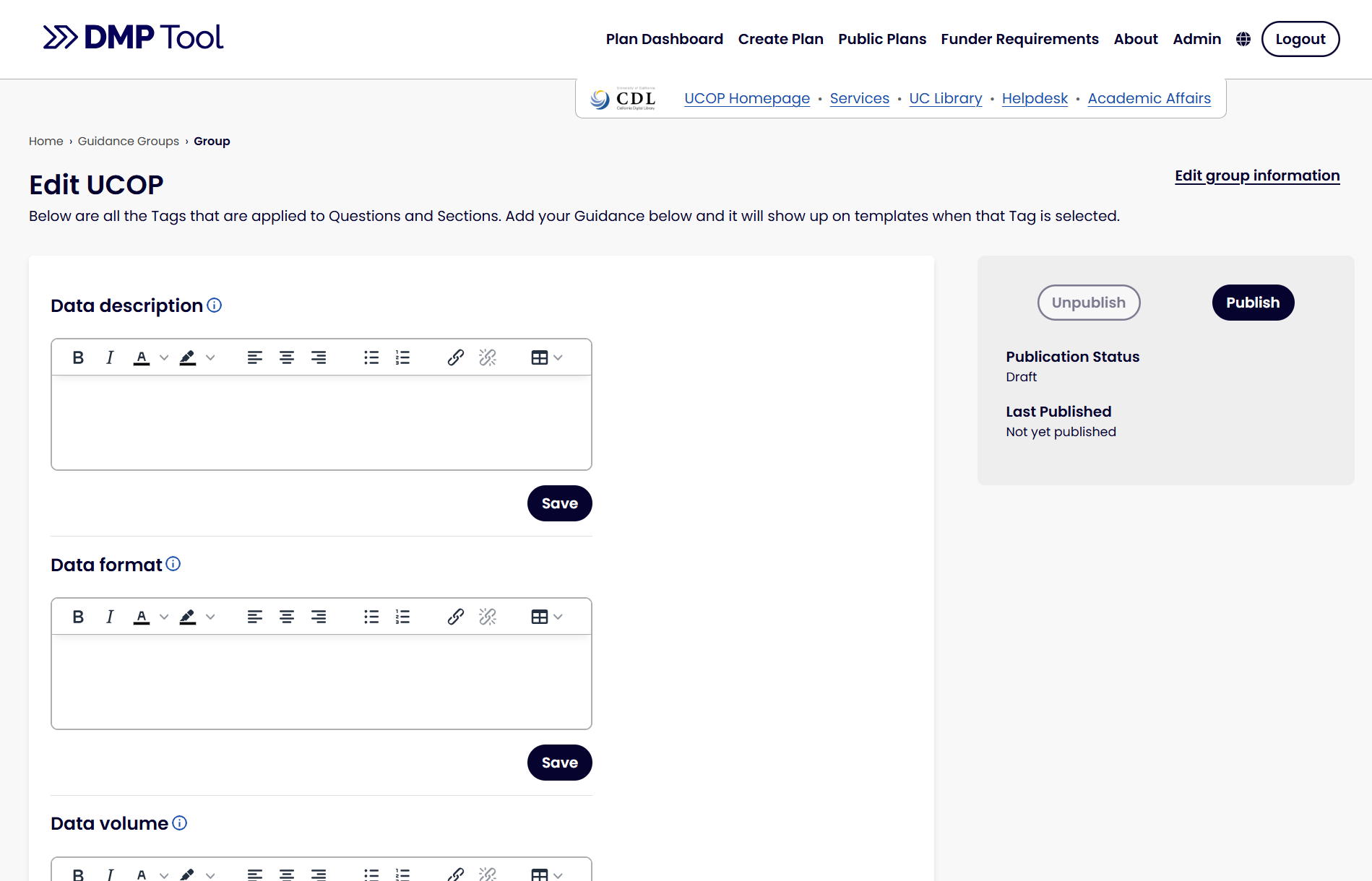
Based on Nathanael’s experience, we have been looking at the following:
- The importance of pasting in from Microsoft Word
- As someone who regularly enters formatted text into Templates and Guidance and sees the current tool strip out all formatting (whether copied from a website, Word document, or even another textbox in the tool), I feel the pain. We’re working to improve this significantly, though we likely won’t get it all perfect. There are difficulties in accounting for the formatting syntax of every word procedure that makes it hard to get the formatting right. That said, it will be much better than before, and we’ll make an extra effort to check how it works with top word processors like Google Docs and Microsoft Word to get the formatting, with links as close as possible to what was copied in. We showed Nathanael how it copies in much better now, though we have found that it’s still not perfect. Hopefully there are at least much fewer steps to fix than there were!
- Being able to see the Guidance at a glance
- Since all the text is editable on one page now, we didn’t have the overview anymore on the main page. Hearing about the importance of seeing that overview at a glance is making us rethink what we can add to the dashboard so admins don’t have to go into edit mode to review their text.
- Fixing the bug that meant links to DMP Tool pages couldn’t be published
- I wasn’t aware of this until Nathanael showed us the issue, so we will look at fixing this in our rebuild!
Our rebuild work continues on, with lots of evolutions over time based on both user feedback and changes to federal funding mandates. We’ll be continuing to gather feedback from admins and researchers over time to make sure the tool works as well as it can for these important functionalities.


You must be logged in to post a comment.