For the past few weeks, we have presented several statistics on our blog. Now, we at DMPTool are interested to know which use statistics you’d like to see next.
Use Statistics Poll
Reply

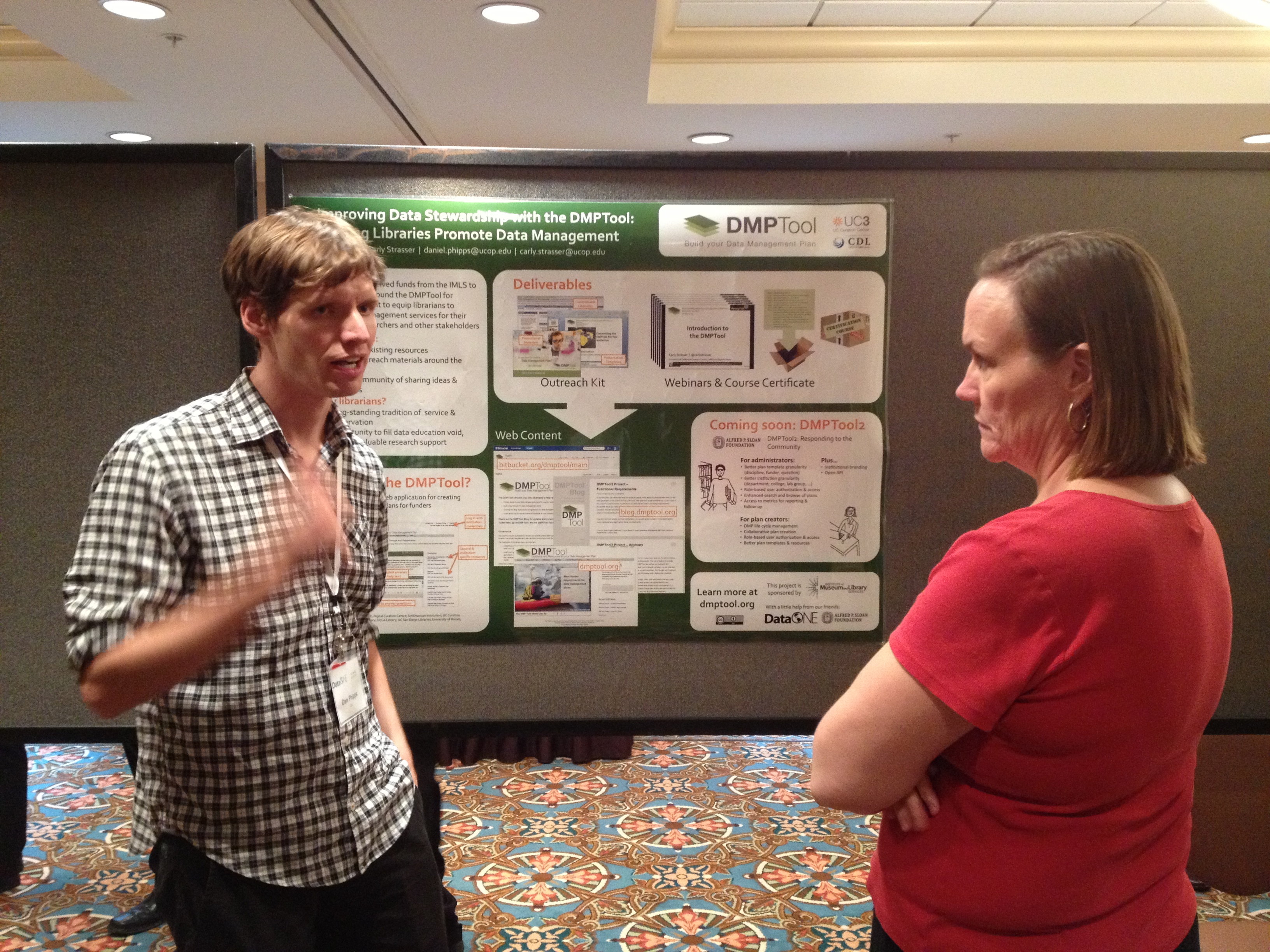
The IMLS Project Poster, presented during the Sunday evening and described with a number of emphatic gestures (as seen here).
The DataONE Users Group meeting in Chapel Hill, North Carolina just concluded, with representatives from data authors, institution support staff, data repositories and aggregators, and other stakeholders in attendance. The DataONE Users Group meeting provides a space for those in attendance to help guide DataONE’s initiatives to better meet their needs. This was a great opportunity to highlight the DMPTool development plans over the coming months, as well as the work we’re doing to provide librarians with high-impact resources for data management support.
The feedback we received with regards to the DMPTool was both extremely positive and useful. As the first step in the data management lifecycle, the DMPTool as a planning aid also serves as an excellent entry point for researchers to be made aware of the resources available at their institution. Arming librarians not only with educational resources such as our webinar series and upcoming promotional materials, but also examples of how others in their field have been active in data services is an effective way to fill the leadership gap in data management.
Several attendees mentioned that one of the key problems facing researchers is a lack of knowledge about data management requirements, best practices, and the support resources available through their institution. Whether its funder requirements, guidance on choosing one or more data repositories, or even the proper language to describe a data management plan, providing knowledge support to researchers during the grant writing period is a great way to demonstrate the librarian’s support role during operational implementation.
As we take this new feedback into account, we’ll continue to assemble useful resources not only for data management, but also DMPTool administration. If you weren’t able to make it out to the DUG meeting this year, the presentations are available at the DataONE User Group page. Feel free to drop us a line at uc3@ucop.edu or email me directly at daniel.phipps@ucop.edu – we’re always interested in new ways that the DMPTool can support the research community.
The poster we presented at the meeting is available on figshare: DOI 10.6084/m9.figshare.730643
The Association of Research Libraries is a nonprofit organization of 125 research libraries at comprehensive, research-extensive institutions in the US and Canada that share similar research missions, aspirations, and achievements.
Update: July 22, 2013: With the recent addition of five institutions, half (50%) of all 125 ARL institutions are now members of DMPTool!
On June 18th we gave a webinar on customizing the DMPTool for your institution. While the recording and slides from that presentation can be found on the webinar series page, here’s a brief review of the major topics that were covered.
The DMPTool comes pre-populated with funder-provided information on how to construct a data management plan. Customizing the tool gives you a chance to modify what grant writers see when using the tool. Broken up into separate sections, administrators can provide help text, suggested answers, contacts at the institution, and resource links such as best practices guides or support groups.

The DMPTool’s audience includes students, researchers, and grant writers. Source: wikimedia commons
Customizing the DMPTool for your users can accomplish two goals. First, by setting up authentication and linking to resources and people from your institution, it encourages confidence in users. There are a lot of resources out there, so researchers will be looking for familiar signs. Second, you can ensure that your researchers are being connected to reliable, up-to-date information.
There are three steps to the customization process. Step one is to set up Shibboleth Authentication. Shibboleth is an open source software package used by many universities to provide a single login for multiple services. This can be extended to work with the DMPTool, to allow researchers to use the same login as other tools at their institution. Shibboleth is not required for customization, but without it researchers have to create their own account which can be a barrier to access. More information on how to set up shibboleth with DMPTool can be found at our website.
The second step is the customization documentation itself. This is where you provide information about your institution, and specific advice for each funder. These documents can be found at the Templates for Institutional Customization page on our bitbucket wiki. The institution settings document lets you select the email address where help requests should be sent as well as resource links that are relevant for each step in the process.
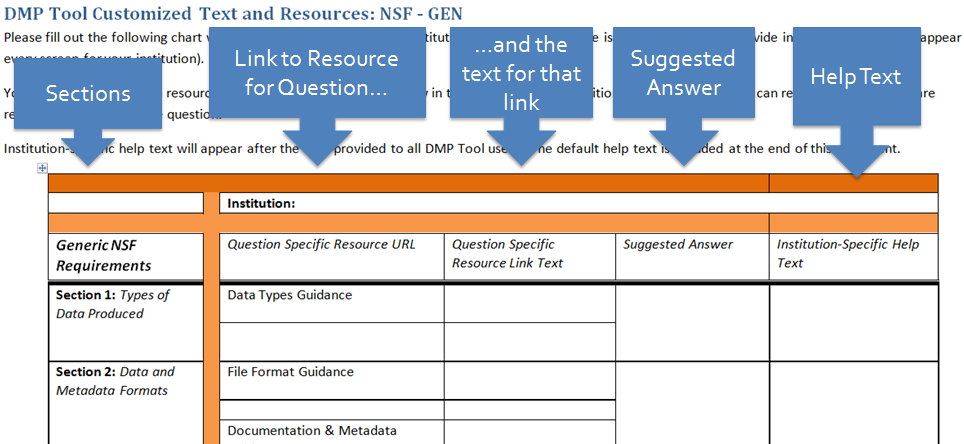
The 5 columns of the Funder Template, and the Information they need
We break up the other documents by funding agency to give you as much control as possible with your customization. Each document is broken up into different sections, and lets you provide resource links relevant to that question, a suggested answer, and help text.
Once these documents are filled out, you can attach them to an email and send them to uc3@ucop.edu for submission. We’ll populate the fields with the information you provide, and add your institution to the dropdown list at the DMPTool website.
We’ve started an Example Documentation page where institutions can share how they’ve used DMPTool customization. This is a great place to start if you want to see how others have customized the DMPTool.
For a more in-depth breakdown of how to customize the tool, as well how we’re working to provide more administrative control in future versions of the DMPTool, check out the full webinar. If you have any questions or feedback, feel free to email me at daniel.phipps@ucop.edu or uc3@ucop.edu.
The most widely-used funder template on DMPTool through 2012 was NSF – BIO.
It appears they are still among the most popular in 2013 so far:
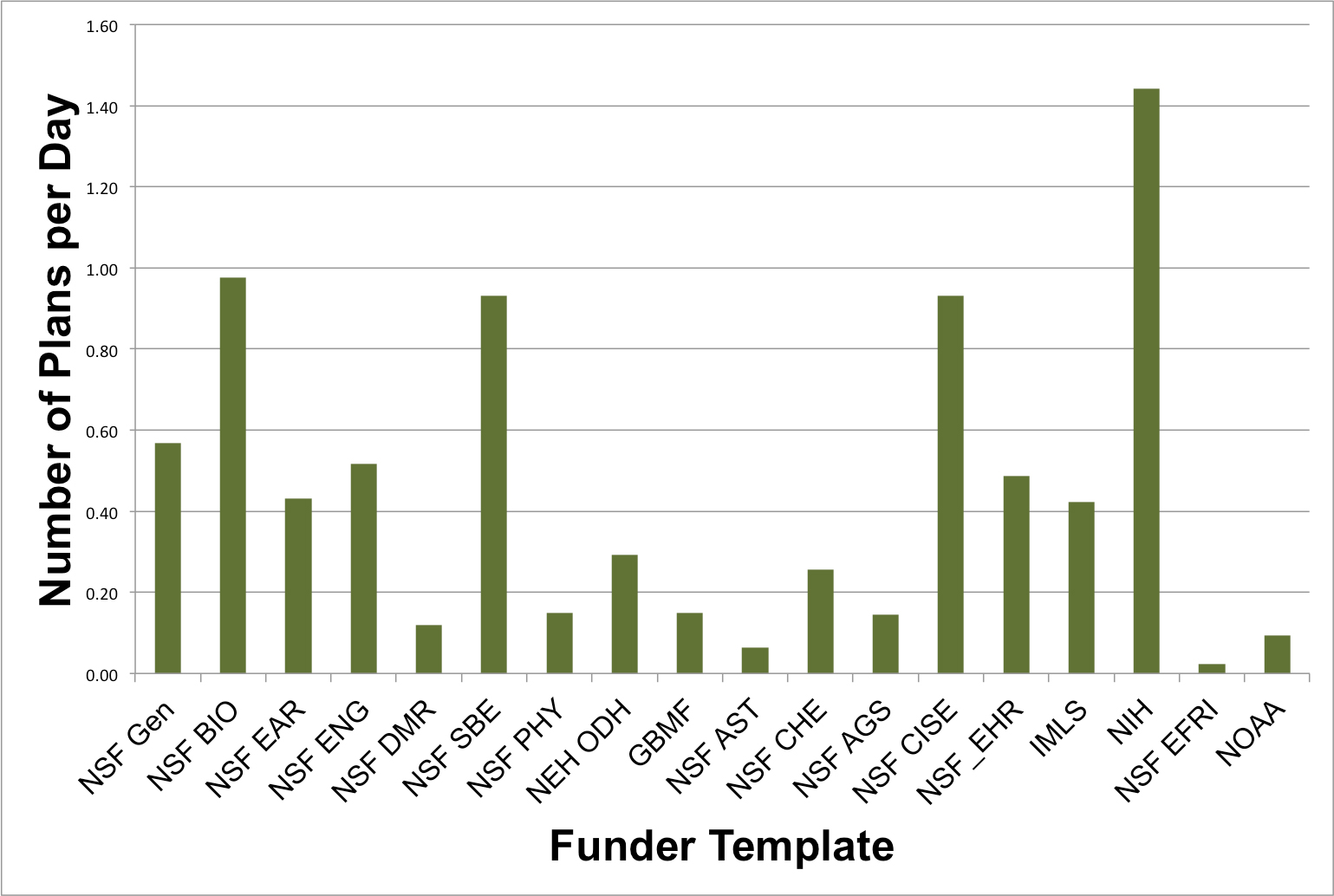
See our previous post on recent NSF – BIO requirement updates.
In our last post, we mentioned that we would be talking more about the development work on the next generation of the DMPTool: the DMPTool2. We have now made available our current draft of the functional requirements. For those of you who haven’t read a functional requirements document, these are fairly detailed documents that specify the capabilities and, well, functions of a system. But this document should begin to give those of you who are interested a sense of where we’re expanding and adding functionality to the DMPTool.
Over the next few weeks, we’ll be highlighting very specific areas to talk in more detail (and in more colloquial language!) about these developments.
The DMPTool 2 project has two advisory boards: one for researchers and one for administrative users, such as librarians, research offices, and IT professionals. The role of both is to provide feedback and guidance on the development of the DMPTool as well as our outreach and communication efforts. May was a busy month for both sets of board members, as we held two (virtual) meetings with each advisory board, with the second meetings. We thought we’d highlight here some of the things that we talked about at these informative and enlightening meetings.
For both boards, we shared examples of the functionality, roles, and wireframes that are under development for the next phase of the DMPTool. For both groups we highlighted the new functionality that will allow researchers to truly collaborate with others on the development of a DMP. For the Administrative Advisory Board, we focused in large part on the new functionality for institutions: ability to customize resource templates, such as local links and help text, requirement templates if an institution has a need to set up their own DMP requirements, and new types of institutional roles such as editors. This was the first chance we had had to share these with people outside of the project team, and we were thrilled to hear positive response to these developments, as well as feedback and suggestions. (Also, watch this space as we’ll be highlighting a lot of this functionality over the next few weeks!)
In response to questions from the first meetings with the advisory boards, we had begun to investigate further some of the usage patterns of the tool. While we have always collected use statistics, we haven’t done much in depth exploration or segmentation of these – for example, tracking numbers of repeat users or understanding spikes in usage of the tool. Working with this data and hearing the questions from board members is helping us to better understand the types of data that would be interesting to the institutions that use the tool, but also how we begin to measure the impact of the tool. For example, is the number of repeat users within a year a strong metric of success? How many researchers apply multiple times for funding within a year? The advisory boards are helping us to think critically about these issues.
We are lucky to have such engaged advisory boards and we encourage you to share your thoughts with board members as well as with us directly!
DMPTool2 is currently immersed in the execution phases of the project. Each team has met significant project deadlines and milestones. Furthermore, the group is deeply engaged with each of the User Advisory Boards, implementing feedback into the project as well as engaging in constructive discussion with each board.
The technical team has made significant progress on development. The technical development schedule has been finalized and is currently on track. Much of the first of four planned phases is complete. Initial wireframes were presented to Administrative User and Researcher Advisory Boards at the end of May. The team is currently processing feedback from the boards to influence some remaining minor changes. As all the login functionality pieces fall into place, focus has shifted toward user interface design. Most functionality should be in place by the end of August, when efforts will transition toward the open API. In preparation, the technical team has already reached out to the Center for Open Science to discuss integrating the DMPTool2 into their Open Science Framework.
The Outreach Coordinator position faced significant bureaucratic delays in May; however, with the coordinator now hired, the team is at work developing an outreach plan. Meanwhile, the team was successful in attaining targeted feedback and directing specific questions to the Advisory Boards in May. The communications team is currently coordinating responses to board inquiries and tentatively scheduling the next meeting for the beginning of September. Furthermore, while the team regularly receives collaborative agreements from Partner Institutions, we have only received 30 agreements. The outreach team is currently discussing strategies to attain the rest in a timely manner. Finally, the recently-launched webinar series has met success. The first two sessions had 150 and 80 participants, respectively.
The outcome metrics outlined in Sloan Foundation communications are currently being used to track and evaluate project success. After defining each metric, the DMPTool team has assessed its progress toward each goal as well as a tentative due date for each. The project management team is currently discussing an objective-based strategy with the outreach team and technical team. Furthermore, we have presented initial impact metrics to Advisory Boards, the feedback from which has proved to be useful in refocusing the team’s current concentration.
Though it is still estimated that certain aspects may carry into early next year, the overall project is on track to end on time. In the next month, we expect to see significant strides in technical development and outreach efforts.
We have determined the top-ranked institutions that use the DMPTool based on the number of users and of plans they create (October 2011 – Present).
Top 10 Institutions by Number of Users:
The following institutions have produced the most number of users on DMPTool.
| Institution | # Users |
|---|---|
| University of Illinois Urbana-Champaign | 161 |
| UC San Diego | 146 |
| UCLA | 141 |
| Stanford | 133 |
| North Carolina State | 121 |
| UC Davis | 114 |
| University of Virginia | 109 |
| University of Washington | 97 |
| UC Berkeley | 92 |
| UC Irvine | 80 |
Top 10 Institutions by Number of Plans:
The following institutions have produced the most data management plans using DMPTool.
| Institution | # Plans |
|---|---|
| UC San Diego | 189 |
| University of Illinois Urbana Champaign | 138 |
| University of Virginia | 115 |
| North Carolina State | 105 |
| UCLA | 103 |
| University of North Texas | 97 |
| Stanford | 88 |
| UC Berkeley | 78 |
| University of North Carolina – Chapel Hill | 74 |
| UC Davis | 73 |
Congratulations to the eight institutions that made both lists: North Carolina State University, Stanford University, UC Berkeley, UC Davis, UCLA, UC San Diego, University of Illinois, and University of Virginia.
While putting together our upcoming webinar on existing data management resources, one consistent source of useful information was librarian-authored research guides called libguides, hosted by various institutions. While we’ll be going into more detail in the webinar itself, I wanted to talk about what makes the libguide platform especially useful to librarians looking to make a data management guide for their patrons.

Libguides are designed to be made up of replaceable parts that are easy to share with other guides. Img source: Wikimedia Commons
Libguides are a web platform designed for librarians to create and share research guides, without having to tangle with web design tools. They can be used to answer frequently asked questions, highlight materials in the catalog, or point to useful outside resources. Organizationally, Libguides are made up of tabs and boxes. Tabs allow you to create sub-pages within the guide to keep content organized. Each page is populated with boxes that contain different kinds of content, such as lists of links, RSS feeds, or videos.
Aside from allowing librarians to assemble simple page structures, breaking the site into various boxes allows users to share individual components of their guides with other librarians for use in their own guides. This means useful information can be repeated across multiple guides without reinventing the wheel. This modularity makes libguides a great tool for disseminating data management information. Not only can librarians create a guide specifically to answer questions about data issues, but relevant pages can be easily ported to subject specific guides. By properly organizing the information on your data management libguide, you can easily re-use pages specific to the sciences or humanities to their relevant topics. Later, when you update these pages the changes will automatically be reflected across all the guides that are using it as a linked page.
When sitting down to create a data management libguide, you should design it in such a way where it can be useful to researchers who might only see a portion of it. Properly sharing individual tabs will not only capture researchers who might not have started considering the data management element of their work, but also guide traffic to the main data management site. Reaching out to the authors of frequently visited libguides can be a good way to add information that might be of value to their patrons.
For examples of data management libguides and other useful resources, check out the DMPTool Community Resources Page. If you need technical advice on how to customize your libguide, check out guidefaq.com to find answers to frequently asked questions about the libguide platform.
 DMP Tool Blog